Solution/TMSTMS / Transportation Management System

Built around real transport operations.
Connected through one system.

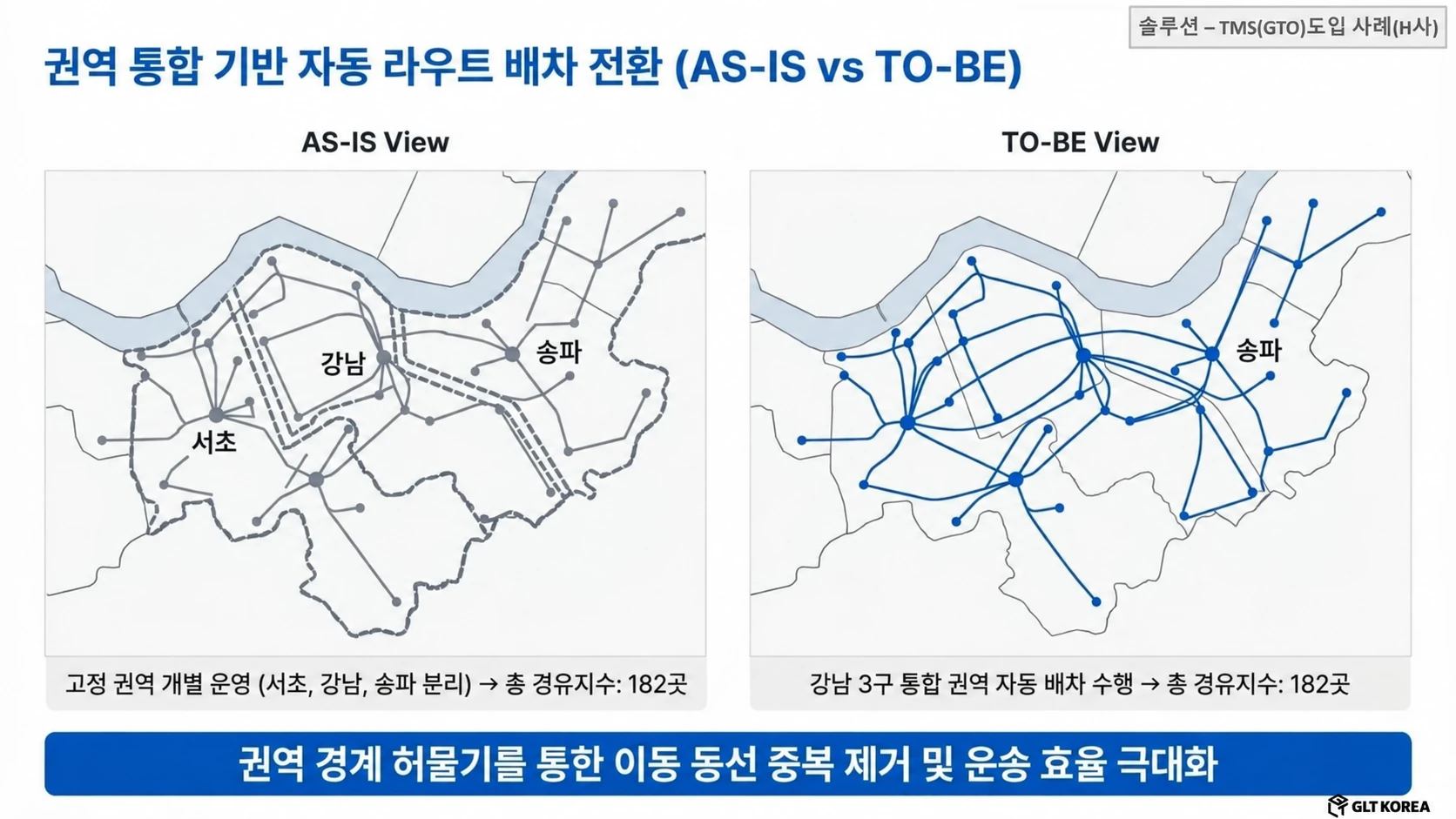
Based on transport orders and vehicle/facility information, we connect dispatch plans, transportation execution, and performance/settlement information. We design the scope of connection between optimization engine, control, mobile, and existing business systems.

TMSTransportation ManagementGLT KOREA / SOLUTIONS
TMS / AVAILABILITY & INTEGRATION

Check the status of introduced features and experiences.

Based on the functions provided by TMS, we discuss the scope of connection and advancement for each customer.

Features currently available

We build a transportation management system centered on order registration, transportation execution order management, dispatch planning and processing, operation logs, and freight billing. We design the range of connection with the optimized engine and field systems together.

Customer-specific linkage functions

It connects ERP/OMS orders, vehicle/driver/location information, on-site mobile, and freight/settlement systems. Processing responsibilities and interfaces are defined according to customer tasks.

Advanced review function

Expansion tasks such as transportation and delivery division, real-time re-vehicle relocation, facility change, and vehicle configuration simulation are reviewed based on construction cases, application versions, and data and connection conditions.

Experience public status

Preparing to release work experience

Currently, we provide an illustrative workflow. The actual work system experience will be released after connection and verification in a separate environment.

TMS Experience Guide ↗

The provided modules, applicable versions, data/interfaces, and construction scope for each customer are confirmed during introduction consultation.

TMS / WORKFLOW & SCOPE

What input does TMS receive and what does it connect to?

TMS connects received orders to transportation execution orders and dispatch plans, and manages everything from dispatch processing to operation records and fare settlement. We introduce the flow with an actual work screen that retrieves data from November 2016 and March 2019 stored in the development environment.

  1. 01Order acceptance

    Confirm center, shipper, origin and destination, order and product details.

  2. 02Dispatch plan/confirmation

    Review undispatched orders and link dispatch plans with transportation request and approval procedures.

  3. 03Check shipping status

    Check the transport order, dispatch number, status, return, hold, and POD information.

  4. 04Performance/Settlement

    Check the delivery tally in the operation log and the cost and deadline items in the freight claim.

Basis: Direct confirmation of order registration, dispatch plan establishment, dispatch processing, transportation execution order management, operation log, and freight billing screen in the GLT TMS development environment on October 26, 2026, G-TO·TMS Introduction (October 2025), pages 4~5·22~26·29~41. The dispatch plan establishment, dispatch processing, and voucher processing screen that confirmed the inquiry data in November 2016 is used as a public example. Order registration and transportation execution order management looked up data from March 2019, and delivery order conditions were selected in transportation execution order management. Individually provided functions and screens are checked according to the applicable version, contract, and scope of connection.

TMS / REAL WORKFLOW

From order to settlement,
Take a look at the actual work screen.

There are four steps to receiving an order, reviewing dispatch, and checking transportation status, performance, and settlement. We have organized the role of each screen and the information leading to the next task.

Search data from November 2016 and March 2019; Personal and transaction identification information obscured
This is an actual work screen that searches the saved data of the development environment on October 26, 2026. Each screen describes the workflow with data stored at different times and does not represent the entire process of the same order or current operating performance. Screens and provided functions may vary depending on the applicable version and deployment scope.

Order reception/confirmation

What needs to be transported where and how much?

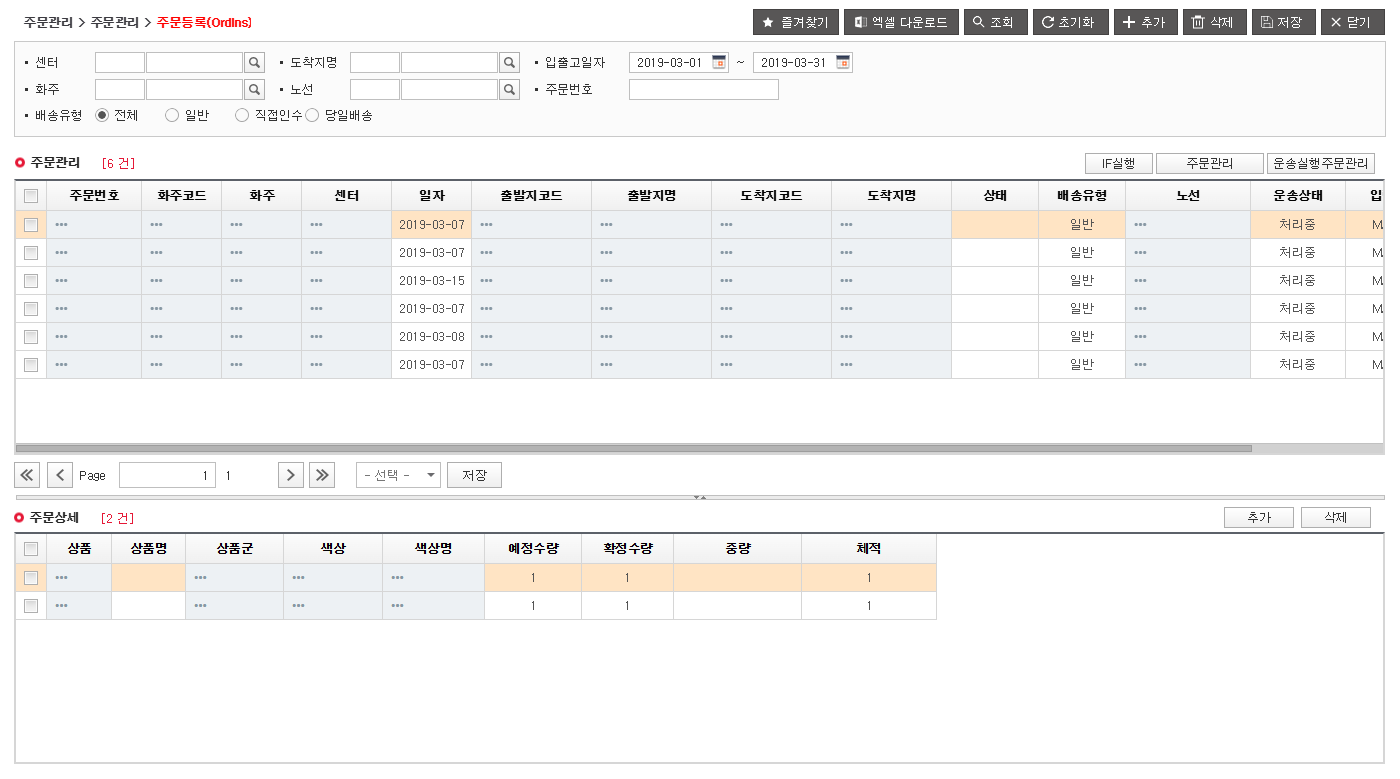
We organize the order information required for transportation, including center, shipper, origin and destination, and quantity, weight, and volume for each product. On the order registration screen, check the date, delivery type, and transportation status of the received order and the product details of the selected order.

  • Order number, shipper, center, origin and destination
  • Planned quantity, confirmed quantity, weight, volume
  • Order status, delivery type, route, transportation status

Order registration · Order and product details

actual development screen
Order registration · Order and product details: This is a screen showing the product details of 6 orders and selected orders in March 2019. You can check the order date, planned quantity, confirmed quantity, and transportation status. Personal and transaction identification information has been masked.View larger screen ↗
This is a screen showing the product details of 6 orders and selected orders from March 2019. You can check the order date, planned quantity, confirmed quantity, and transportation status. Personal and transaction identification information has been masked.

Original Korean source material. See the English explanation on this page.

next stepsThe received order is subject to transportation execution order and dispatch review.

Dispatch plan/confirmation

What orders are dispatched together and how do they get executed?

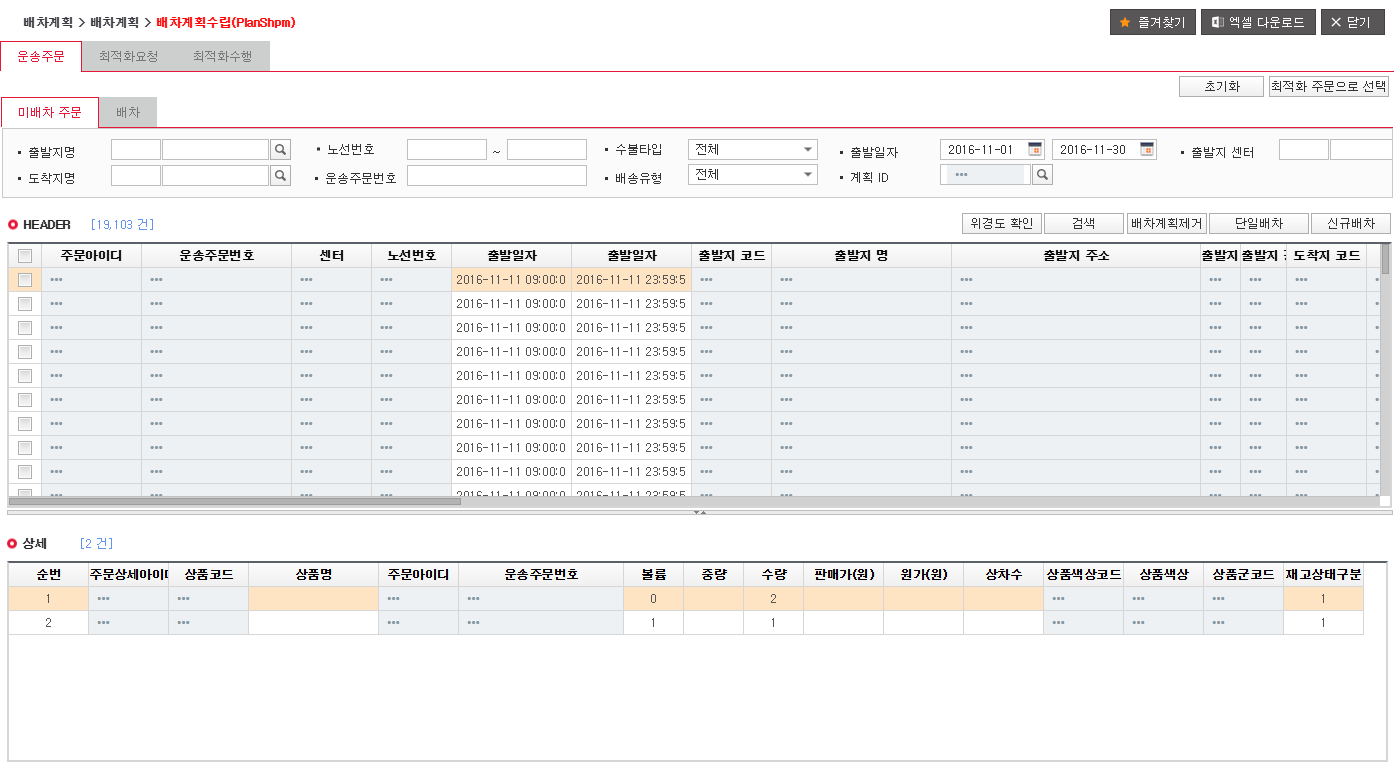
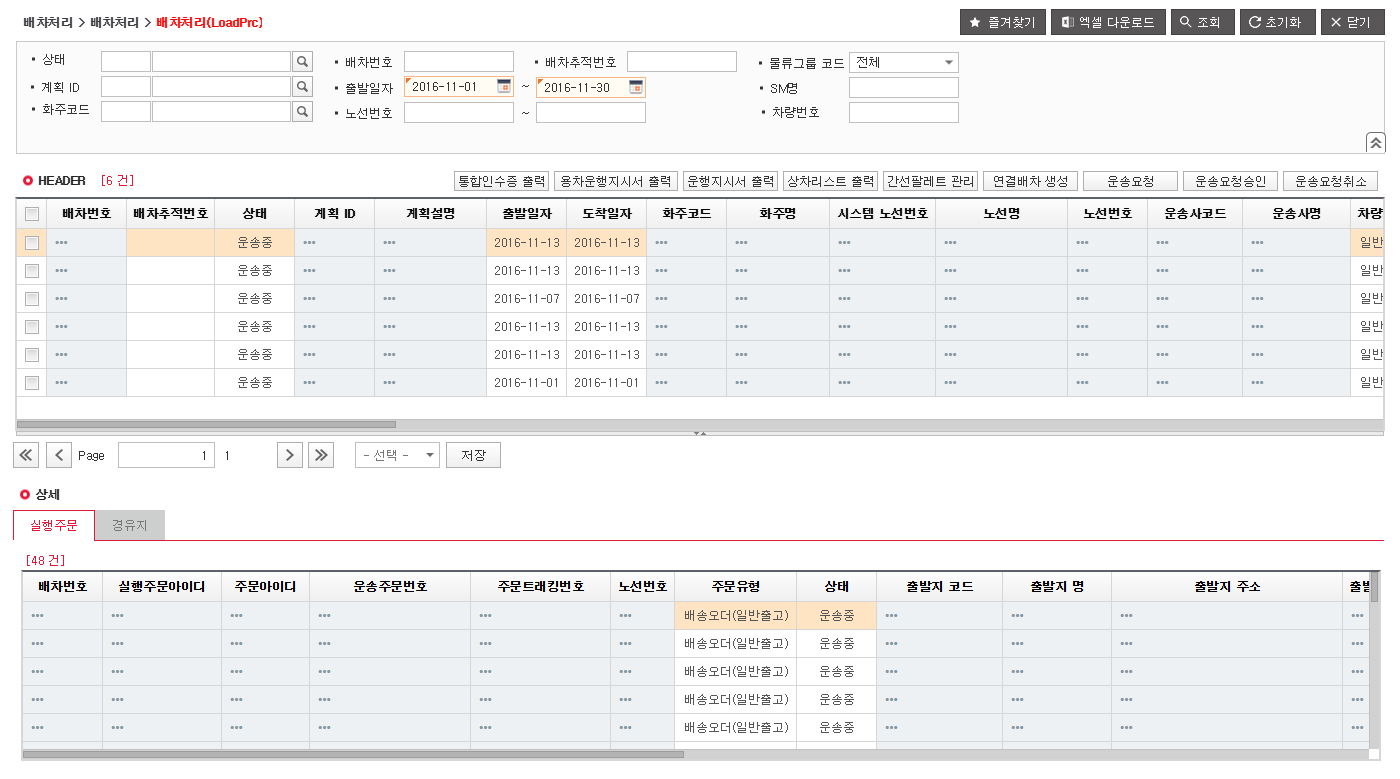
In the dispatch plan establishment, the undispatched order/plan ID and product details are confirmed, and in the dispatch processing, transportation requests/approval by dispatch number and management of execution orders and stops are performed.

  • Undispatched vehicle order/plan ID/optimization request
  • Review of new dispatch, single dispatch, and dispatch plan
  • Transportation request/approval/cancellation/operation order

Establishment of dispatch plan

actual development screen
Establishment of dispatch plan: This is the dispatch plan screen showing transport orders and product details in November 2016.View larger screen ↗
This is the dispatch plan screen showing transport orders and product details in November 2016.

Original Korean source material. See the English explanation on this page.

Dispatch processing and execution order

actual development screen
Dispatch processing/execution orders: Shows the execution orders linked to the dispatch list from November 2016 data. You can check the shipping status, with identifying information hidden.View larger screen ↗
It shows the dispatch list and associated execution orders from November 2016 data. You can check the shipping status, with identifying information hidden.

Original Korean source material. See the English explanation on this page.

next stepsCheck the transportation status by linking the confirmed dispatch and execution order.

Check shipping status

To which dispatch is the order placed?

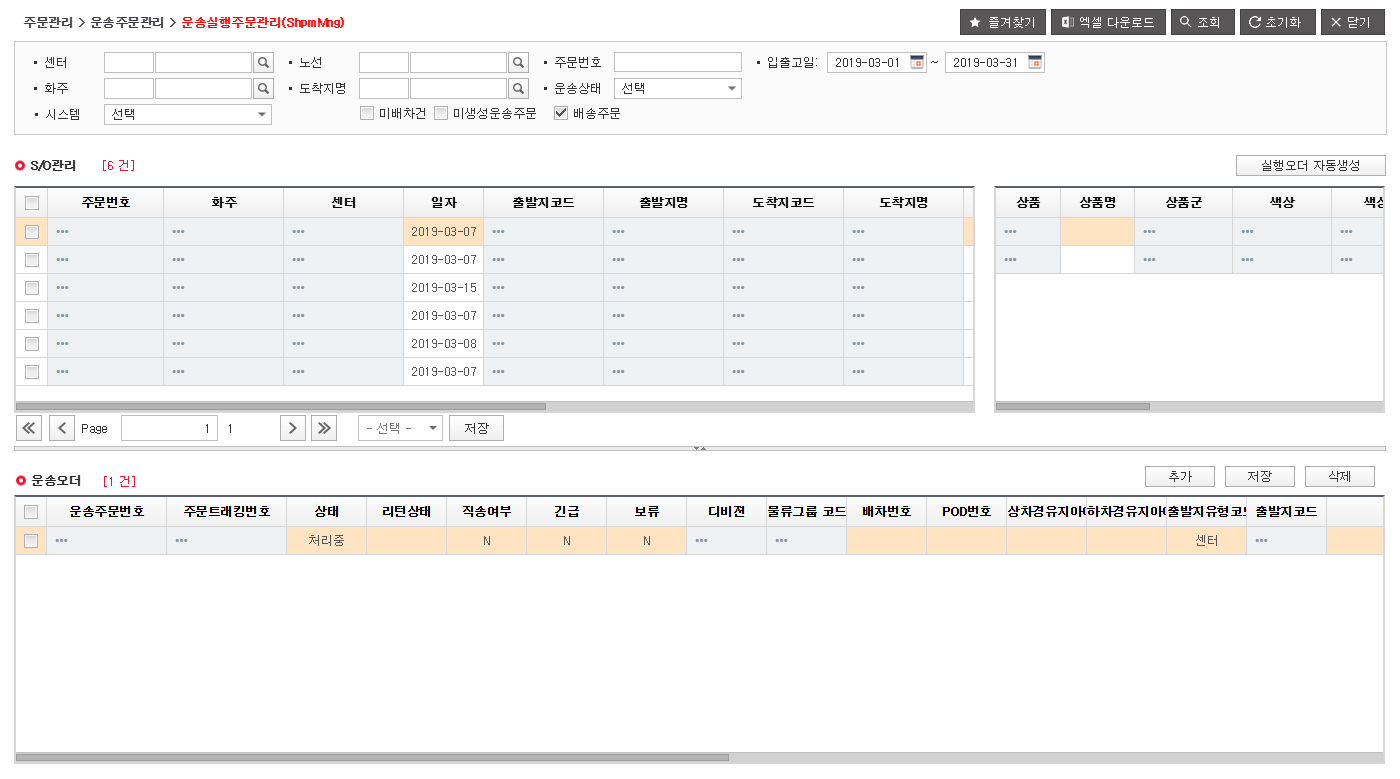
In Transportation Execution Order Management, check the transport order linked to the received order. We review follow-up work by dividing each order into dispatch number, POD number, processing status, and return, direct delivery, urgent, and pending items.

  • Transport order linked to received order
  • Processing status, return status, direct delivery, urgent, pending
  • Dispatch number/POD number connection items for each order

Transportation execution order management · Delivery order

actual development screen
Transportation execution order management · Delivery order: This is the screen viewed by selecting the delivery order conditions in March 2019. It shows 6 received orders and 1 transport order linked to the selected order. In this example, the dispatch number and POD number are blank, and personal and transaction identification information has been masked.View larger screen ↗
This is the screen viewed by selecting delivery order conditions in March 2019. It shows 6 received orders and 1 transport order linked to the selected order. In this example, the dispatch number and POD number are blank, and personal and transaction identification information has been masked.

Original Korean source material. See the English explanation on this page.

next stepsWe then proceed to verify the information needed to review your driving record and transportation claim.

Performance/Settlement

How do I check the results of my trip and how much transportation I will be charged?

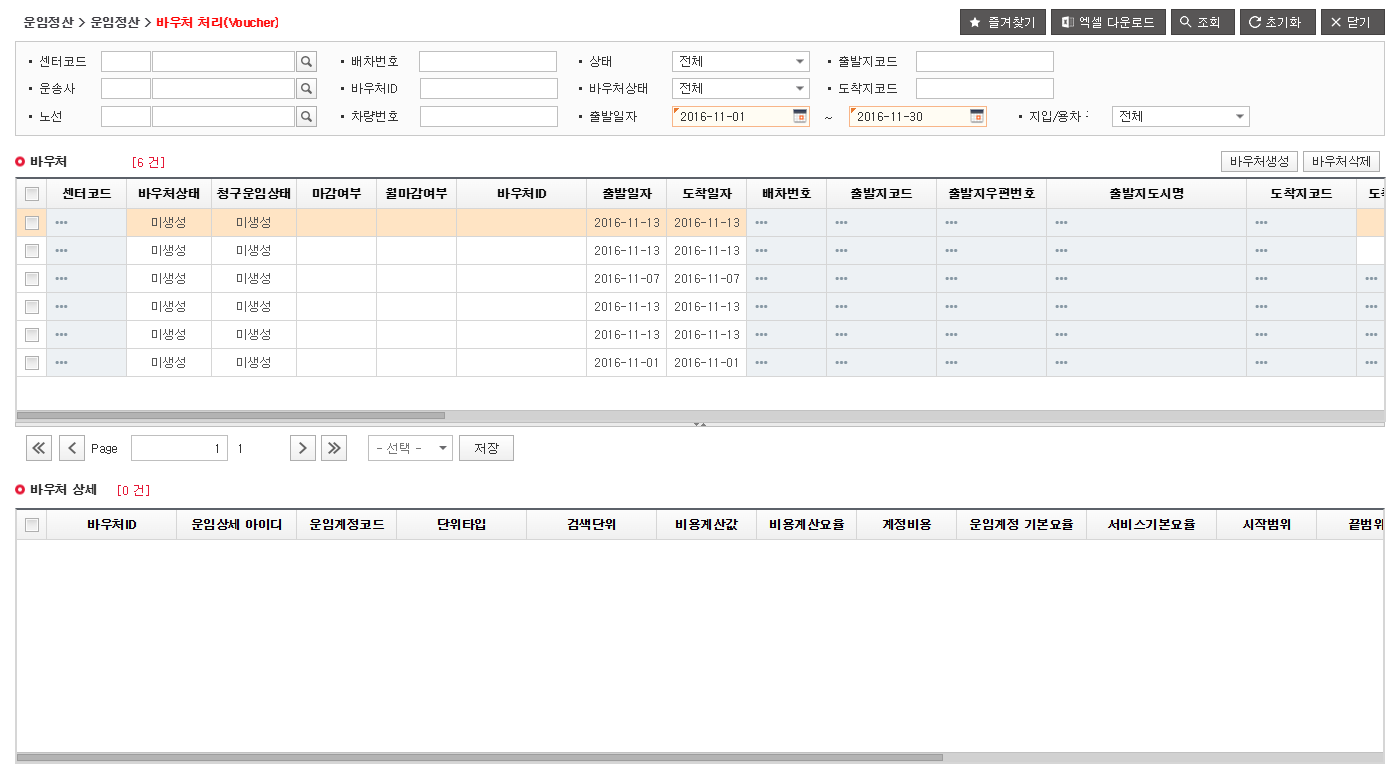
Link your driving records and fare information to review the items required for settlement. On the voucher processing screen, you can check the status of the voucher and billed fare for each distribution, whether it is closed, and the fare account and cost calculation items.

  • Voucher target/transportation date for each distribution
  • Voucher/charge status/closing status
  • Linkage of freight account/cost calculation items and billing

Voucher destination and settlement status

actual development screen
Voucher targets and settlement status: This is a list of voucher targets as of November 2016. The displayed non-created status does not indicate a confirmed fare or a completed settlement.View larger screen ↗
This is a list of voucher targets from the November 2016 inquiry data. The displayed non-created status does not indicate a confirmed fare or a completed settlement.

Original Korean source material. See the English explanation on this page.

Work useOperation and costs are reviewed together and used as a basis for settlement and follow-up work.

TMS / BEFORE YOU START

Before TMS introduction
Please check any questions you may have.

From data preparation to existing system connection, result review and introduction procedures. This is a frequently asked question when determining the right coverage for your business.

TMS introduction consultation ↗
Can I build TMS by connecting with existing ERP, WMS, and OMS?

The construction scope can be designed based on the premise of linking with the existing system. Determine the transmission/reception items of orders, standard information, performance, and freight, data management entity and processing time, and check the interface.

System connection and construction procedures
What information do I need to organize before building TMS?

Order, shipper, facility, vehicle, carrier, freight rate standards and current dispatch, transportation, and settlement procedures are summarized. Check the time of status change, responsible authority, and data to be exchanged and received from the existing system.

Check flow with actual work screen
Can I review manual dispatch and optimized dispatch together?

It is possible. Review the dispatch plan and optimization results according to the task, and determine the confirmation, transportation request, and approval procedures for the person in charge. The supported version and linkage range of the optimization engine are checked at the construction stage.

Actual screen of dispatch plan and dispatch processing
Where can I check undelivered car orders?

It is checked based on the undispatched orders in dispatch plan establishment and the undispatched conditions in transportation execution order management. After checking order status, vehicle, and site constraints, the person in charge reviews dispatch or replan targets.

Transportation execution order and status confirmation screen
Are the vehicle location and the driver’s mobile connected together?

For control and mobile, the connection range is determined and applied for each customer. After confirming the location collection method, on-site status update method, and information and processing responsibilities to be delivered to the technician, the scope of construction is confirmed.

Scope of connection with field systems
What items are checked in shipping cost settlement?

On the freight claim screen, check the basic transportation cost by dispatch, vehicle, and transportation company, the total billing fee, and whether it is closed. The actual settlement rules and items to be delivered to the ERP/accounting system are determined according to the customer's business.

Fare status/settlement preparation screen
What is verified when moving existing work to a new TMS?

We verify the flow from order reception to dispatch, transportation, and settlement using representative orders and exceptional situations. We check standard information, transfer data, connection error handling, and responsible authority, and discuss training, pilot, and operational transition standards.

Verification, training, and operation transition procedures
What determines the TMS construction period and cost?

It varies depending on applicable modules such as ordering, dispatch, control, and settlement, number and method of linked systems, data transfer, on-site mobile, and customer-specific business rules. After checking the data and confirming the scope, we will inform you of the schedule and cost.

TMS implementation scope consultation
YOUR OPERATIONS / NEXT STEP

Where should we start improving the existing TMS and field work?

Please let us know what parts of the system you would like to maintain and what tasks you would like to change. Review the scope of connection between order, dispatch, transportation status, performance, and settlement.

Please choose a situation that is close to our company.

Having these materials will be helpful in your review.

  • Current work flow
  • Linkage method with existing ERP/TMS
  • Representative order, operation, and settlement items

Even if you don't have any data yet, you can tell us about your current situation. Information that is difficult to disclose may be reviewed as a sample with identifying information masked.

In consultation, the scope is set as follows.

  1. Check current work and improvement goals
  2. Summary of data/constraints and comparative verification scope
  3. Link to existing systems and discuss scope of construction
Consult on our company’s assignments Apply without registering and select system/size input
STAY CONNECTED

Stay up to date with logistics.

Cases, product news and implementation guides for your interests. Subscribe with email verification and your consent.

Subscribe to GLT →
LET’S SOLVE IT TOGETHER

What logistics challenge
are you facing?

Talk to GLT ↗